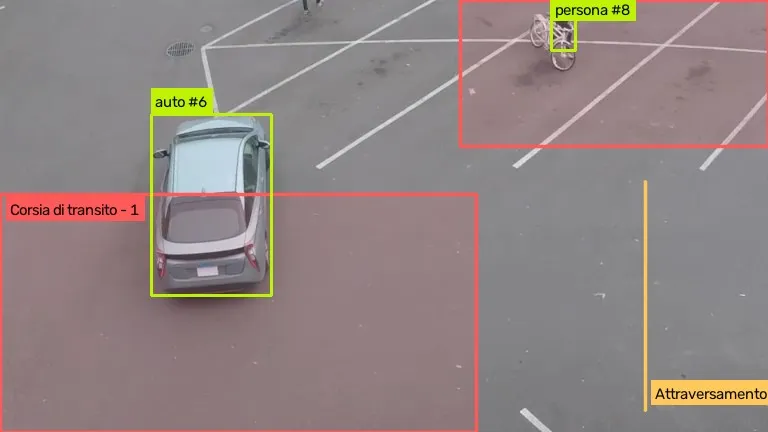
Real frame analysed by AREA · Sample video: Intel, CC BY 4.0 · Junction: Caltrans public camera, California, used for demonstration
In short
AREA brings object detection to the streets: it recognises pedestrians, bicycles, cars, buses and lorries, and flags who enters a zone or crosses a line, vehicles stopped beyond the time you choose and areas over a set number of people.
How is object detection used in a smart city?
Cities already have plenty of cameras. AREA, based on computer vision, watches them continuously and turns what it sees into events: who is where, for how long, how many people are in an area. Find out how AREA works.
How are crossings monitored?
You draw the crossing as a zone or a line: AREA flags the pedestrians using it and the vehicles stopped on it.
Vehicles stopped where they should not be
AREA counts the time spent stopped, not the time passing through: a car slowing down is not a stopped car.
Crowded areas
AREA counts the people in a zone and alerts you when they exceed the number you choose.
Benefits
- Events with photo and clip
- Faces blurred
- Rules for each camera
- Works with existing IP cameras
Can you look for specific objects?
Yes, by describing them in words with AREA Custom, for example road works cones or a barrier. It needs trying on your cameras: distinctive objects work well, generic ones much less so.
Road works cones and barriers
AREA alerts you when the cones are gone. At night, if the zone is too dark to judge, it raises no alarm.
Fly-tipped waste: to be tested
Bags or bulky items left next to bins are generic objects: they can be described in words with AREA Custom.
Benefits
- No training
- Threshold set on your view
- Objects in words
- An event when something changes
What does the council receive?
An event for every rule triggered, with the camera, the time, a photo and an 8-second clip, and faces blurred. Events reach the panel in real time and are confirmed or marked as false alarms.
What about mobility?
For roads, stops, public transport and car parks there is a dedicated solution: computer vision for transport and urban mobility. AREA flags vehicles stopped on the carriageway, people in restricted areas and how many people are waiting at a stop.
Watch AREA at work
53 seconds of real video analysed by AREA: it flags cars entering the “Through lane”, pedestrians on the crossing and bicycles in the “Pedestrian area”.
Sample video: Intel, CC BY 4.0
What we measured
Neurally internal test, 15 November 2026, on sample videos and public cameras.
- At night, on a Caltrans public camera at roadworks, cones described in words were found in 74% of checks at a 0.2 threshold. That is why an object rule decides by majority, on 80% of the checks of the last few seconds, not on a single check.
- When a zone is too dark to judge, AREA raises no alarm rather than a false one.
Other AREA solutions
Frequently asked questions
AREA’s answers to questions about object detection in cities.
What is object detection used for in a smart city?
To turn urban video into events: a pedestrian on the crossing, a vehicle stopped where it should not be, an overcrowded square. Whoever has to act knows as it happens.
Does AREA recognise dumped waste?
It is not a ready-made feature. You can try describing them in words with AREA Custom, but bags and bulky items are generic objects: it needs checking on your cameras before you rely on it.
Does AREA read number plates?
No. AREA recognises vehicles and their type, car, lorry, bus, motorbike or bicycle, but it does not read number plates.
Does AREA work with cameras already installed around the city?
Yes, if they are IP cameras streaming over RTSP or HLS. We have also tried it on public road cameras, by day and by night.
How can I try AREA?
Contact us: we will run AREA on a few minutes of video from your cameras and show you the events it finds.
What do you want AREA to see for you?
Couldn’t find the answer you were looking for? Contact us and we’ll get back to you as soon as possible!
Or email us at info@neurally.it or call us on +39 0532 1717097.