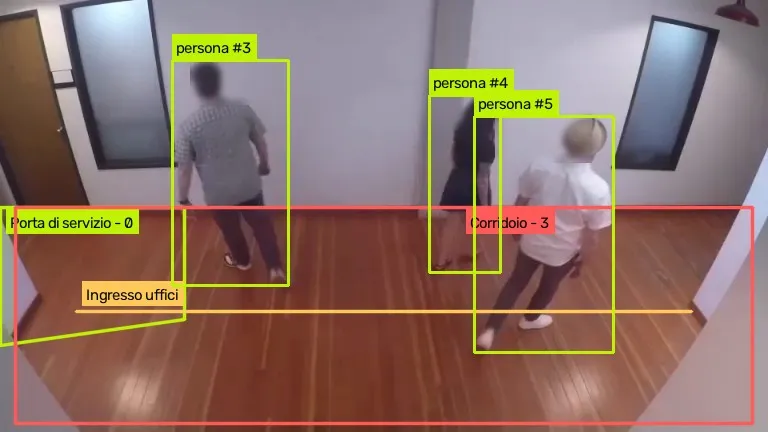
Real frame analysed by AREA · Sample video: Intel, CC BY 4.0 · Junction: Caltrans public camera, California, used for demonstration
In short
AREA is video analytics software that applies object detection to surveillance footage: it recognises people, vehicles and objects in the zones you draw and flags entries, crossings and lingering in real time, with a photo and a clip of every event and faces blurred.
What does AI video surveillance software do?
A camera that only records is useful afterwards. AREA watches the video as it arrives: with computer vision it recognises who and what is in the frame and applies the rules you set. When a rule is triggered, the event reaches the panel straight away with a photo and a clip, and whoever checks it confirms it or marks it as a false alarm. Find out how AREA works.
What does AREA detect in surveillance footage?
Six tasks AREA carries out on its own, on the cameras you already have, live or on recorded footage.
Automatically detects objects and people
AREA automatically identifies and tracks people, vehicles and other objects of interest in a video stream, and monitors critical areas in real time without the need for constant human intervention.
Flags lingering
AREA measures how long a person or a vehicle stays in a zone and alerts you beyond the threshold you choose, for example two minutes outside a side entrance.
Protects the perimeter
You draw the perimeter or a line on the boundary: AREA alerts you when a person enters the zone or crosses the line, even in one direction only.
Watches entrances
AREA flags who enters a restricted zone and when. It does not identify people: knowing who is authorised stays with your access control system.
Tells people, vehicles and animals apart
A motion sensor goes off for a cat or a branch too. AREA alerts you only for the objects you choose, for example people, and only in the zones you draw.
Photo and clip of every event
Every event has a photo and an 8-second clip, 4 seconds before and 4 after, with faces blurred: there is no need to review hours of footage to understand what happened.
How does it reduce false alarms?
AREA recognises what is moving in the frame, telling a person apart from an animal or a vehicle, for example. Alerts go out only for the objects you choose, in the zones you draw, and every false alarm you mark helps to tune the thresholds.
Does it work with the cameras you already have?
Yes, if they are IP cameras streaming over RTSP or HLS: AREA analyses their live streams and recorded videos too. See the four steps to get started.
What are the benefits of video surveillance with AREA?
Only the objects you choose
It tells people, vehicles and animals apart, and alerts you only for the ones you care about.
Evidence for every event
Photos and clips with faces blurred, without reviewing hours of footage.
Real-time monitoring
Watches over critical areas without the need for constant human intervention.
With the cameras you already have
It uses the streams of the IP cameras already installed.
Watch AREA at work
49 seconds of real video analysed by AREA: it counts who crosses the “Office entrance”, flags anyone entering the “Service door” area and alerts when there are more than 2 people in the corridor. Faces are blurred.
Sample video: Intel, CC BY 4.0
What we measured
Neurally internal test, 15 November 2026, on sample videos and public cameras.
- Described in words with AREA Custom, the corridor door was found in 100% of checks at a 0.3 threshold.
- Objects that were not in the shot, such as a forklift, a dog, fire or smoke, never went above the 0.3 threshold.
- Faces are blurred in the live view and in the event clips.
Other AREA solutions
Frequently asked questions
AREA’s answers to questions about AI video surveillance.
What is AI video analytics?
It is the automatic analysis of surveillance footage with computer vision algorithms, which recognise people, vehicles and objects and flag relevant events. Unlike recording alone, it alerts you while the event is happening.
Does AREA work with cameras that are already installed?
Yes, if they are IP cameras streaming over RTSP or HLS: AREA analyses their live streams, and recorded videos too.
Does AREA also analyse recorded video?
Yes. It applies the same rules to a recorded video and finds the events, each with its own photo and clip.
How does it reduce false alarms?
It recognises what is moving, telling a person apart from a vehicle or an animal, for example. That way alerts go out only for the chosen objects in the defined zones.
Does it work at night?
It depends on the light. In poor lighting AREA misses some objects, especially distant ones or those dazzled by headlights: for dark areas an infrared camera or a light is worth having, and a test on your own views.
How can I try AREA?
Contact us: we will run AREA on a few minutes of video from your cameras and show you the events it finds.
What do you want AREA to see for you?
Couldn’t find the answer you were looking for? Contact us and we’ll get back to you as soon as possible!
Or email us at info@neurally.it or call us on +39 0532 1717097.